
At some point this year, you probably opened all three tabs ChatGPT, Claude, Gemini stared at the logos like a Netflix row, and thought: “I just want one of you to do my work, why is this a whole decision?”
You are not alone.
Every homepage says the same thing: smarter, faster, more context, “your AI copilot.” Then you look at pricing pages, token charts, “Pro,” “Team,” “Business,” context windows measured in novels, and suddenly that assignment you were avoiding looks pretty attractive.
So here’s the deal: by the time you’re done with this article, you’ll know exactly which of the three you should pay for based on what you actually do all day . Not vibes. Not hype. Use‑cases.
We’ll talk about what the models are objectively good at (benchmarks, context, pricing), what they’re like in real use (coding, long docs, Google integration), and where they quietly suck. And yes, we’ll answer the one question nobody phrases out loud but everyone is thinking: “Can I just stay on free… or is that a fake economy?”
THE THING NOBODY ACTUALLY SAYS OUT LOUD
Here’s the part most “ultimate comparison” guides politely avoid: you don’t actually need “the best AI in 2026,” you need the one that annoys you the least for your specific work.
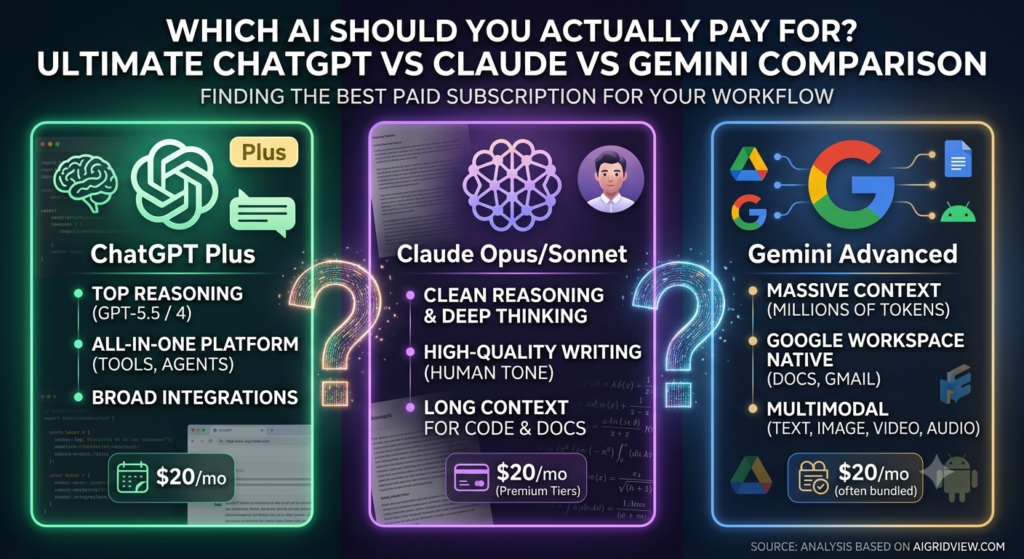
On paper, these models are all monsters. GPT‑5.5 inside ChatGPT is topping a lot of reasoning and math benchmarks. Claude’s latest Opus/Sonnet generations punch harder on complex reasoning and long documents, especially for code and dense text. Gemini’s Pro/3.1 line gives you absurd context windows and native multimodal text, images, video, audio plus Google integration.
In your actual life, that translates to much simpler questions:
- “Which one makes my coding homework and side projects less painful?”
- “Which one won’t choke when I paste a 90‑page PDF?”
- “Which one understands my Drive and Gmail without me babysitting it?”
- “Which one doesn’t wipe out my food budget?”
Most people will never hit the technical limits the product pages brag about. The pain hits way earlier: weird refusals, rate limits, random “too busy” messages, or outputs that feel smart but slightly unhinged.
The other quiet truth: you will end up with at least two of these in your life anyway. ChatGPT is still the default generalist for a lot of people. Claude is what they open when a task feels too “thinky” or long. Gemini is the one that sneaks in via Gmail, Docs, and Android.
Here’s the bit nobody frames properly: the real cost is not the subscription it’s context switching. Three different stories. Three different quirks. Three different places where your half‑finished ideas go to die.
Benchmarks help, sure. One breakdown found ChatGPT scoring around 75% on a blended benchmark set, Gemini around 65%, while Claude often wins when the task is “look at something big and reason through it carefully.” Another analysis suggests Gemini 1.5 Pro can be more than 90% cheaper than Claude Opus at scale thanks to its token pricing and giant context window.
Nice numbers. But here’s what actually matters, and we’ll keep coming back to this:
- ChatGPT is your default Swiss‑army option especially if you want lots of tools baked in.
- Claude is your “please don’t hallucinate, just think” option for long text and code.
- Gemini is your “I live in Google everything, please just plug in” option with absurd context and multimodal.
You pay when one of those three statements feels like your life.
Also, one uncomfortable little reality: ChatGPT’s free tier now ships with hard message limits and ads in some regions, which is the product’s way of saying “this is for dabblers, not people doing serious work.” Free feels fine until it rate‑limits you mid‑assignment and suddenly you’re on the pricing page at 2 am
HOW THIS ACTUALLY WORKS THE REAL MECHANICS
Let’s strip the branding off and talk mechanics. Underneath the colors:
- ChatGPT is OpenAI’s consumer front-end for GPT‑5.x models and tools like Deep Research, Sora video, code assistants, and “Agents.”
- Claude is Anthropic’s “constitutional” AI, tuned hard on safety and reasoning, with Opus/Sonnet/Haiku tiers for different speed/cost trade‑offs.
- Gemini is Google’s umbrella for 1.5/3.x models, deeply wired into Workspace, Android, and Chrome, with giant context windows and strong multimodal.
The niche angle here the bit generic articles skip is that the tier math and ecosystem lock‑in matter more than raw IQ.
Pricing and tiers (aka how they really get you)
- ChatGPT has gone full streaming-service. Free, Go (~$8), Plus ($20), Pro $100, Pro $200, Business, Enterprise. Features like GPT‑5.5, Deep Research, and the big context windows live behind Plus and above. For most serious students or indie devs, Plus is the sweet spot: strongest model, decent limits, no ads.
- Claude runs on usage-based pricing via API, plus paid web tiers; Opus is premium, Sonnet cheaper, Haiku cheapest. For heavy users, Haiku/Sonnet is the practical daily driver; Opus/Sonnet Pro is for “this really matters, don’t mess it up” runs.
- Gemini’s Pro/Flash models are priced aggressively low per token, and one analysis found Gemini 1.5 Pro can be roughly 92–93% cheaper than Claude 3/4 Opus at mid‑market volume. Also, if you’re on certain Google subscriptions, you get some Gemini access bundled.
If you’re just reading that and shrugging, that’s the point: most normal users shouldn’t be choosing based on token math. You choose based on where your work already lives and which plan tier gives you enough without wrecking your budget.
Real mechanics in daily life
Here’s the part you actually feel:
- ChatGPT – tools and convenience
- Feels like a “platform”: chat, web browsing, code, AI agents, and often the best third‑party integrations.
- Great generalist for coding, content, explanations, and “talk to the web” tasks.
- Weakness: free tiers are now throttled and ad‑supported; if you lean on it for serious work, you’ll hit limits fast.
- Claude – reasoning and long text
- Often preferred for long documents, careful analysis, and clean, human-sounding writing.
- Strong at coding comprehension understanding big codebases, refactoring, writing tests.
- Weakness: premium tiers are pricier, and some people find it more conservative or slower on heavy reasoning tasks.
- Gemini – context and Google integration
- Natively multimodal and deeply tied into Docs, Sheets, Gmail, Slides, and Android.
- Giant context windows (millions of tokens) are ideal for “here’s my whole research PDF pile, help.”
- Weakness: quality is very good but a bit behind the best ChatGPT/Claude models on some reasoning and code benchmarks.
Short list, with real opinions:
- ChatGPT Plus: default if you want one subscription that “just works” across most tasks.
- Claude: Your choice if you care more about quality of thought than kitchen-sink features.
- Gemini: your pick if your life is already 80% Google and you’re constantly in Docs and Drive.
We’ll get to what this means when you actually try to live with one of them.
COMPARISON WHAT’S ACTUALLY DIFFERENT BETWEEN YOUR OPTIONS
| Option | What it actually does | Who it’s for | The catch |
| ChatGPT | Generalist with top-tier models, tools (code, research, agents), and broad ecosystem. | Students, devs, and builders who want one strong default. | Free is throttled and ad-supported; serious use basically means Plus. |
| Claude | Strongest at long-form reasoning, careful writing, and code understanding. | People who care about clarity, analysis, and fewer weird answers. | Premium tiers cost more; web UX and ecosystem are leaner. |
| Gemini | Massive context, multimodal, and deep Google Workspace integration. | Heavy Google users, researchers, and Android/Chrome people. | Slightly behind on some reasoning benchmarks; UX still catching up. |
If you’re totally lost: pay for ChatGPT Plus as your first serious subscription, unless your main life is Google Docs (then Gemini), or your main pain is “I need this thing to think clearly through long, messy problems” (then Claude).
WHAT ACTUALLY HAPPENS WHEN YOU TRY THIS
Here’s how it plays out when you stop reading reviews and actually start using these things.
You start with ChatGPT because that’s what your friends, TikTok, and every second YouTube thumbnail screams at you. You sign up, try Free, hit the “10 messages / 5 hours” wall once or twice, and eventually cave for Plus. Suddenly everything is smoother. GPT‑5.5 feels smart, the web tool saves you from doom‑scrolling search results, code suggestions land more often than they miss.
The surprising bit: after a few weeks, you realize ChatGPT has quietly become your second brain. Homework explanations, project planning, debugging weird Python, drafting emails to profs or clients it lives there.
Then you run into your first “oh” moment: a big PDF or a long document. You paste it in segments. You babysit the context. Something feels off. You hear that Claude can ingest entire long texts and reason over them better, so you try it.
Claude’s vibe is different. Less flashy UI, more “serious assistant” energy. You paste long docs, and it doesn’t freak out. You ask for careful analysis, and the answers feel measured instead of overconfident. If you’re coding, the first time Claude refactors a messy file and explains what he did, you get it.
Pattern most guides miss: people start with ChatGPT, then keep Claude around as the “grown-up” for tasks where they need less hallucination and more thinking.
Then there’s Gemini. For a while, you ignore it because, honestly, Google’s branding around “Gemini everywhere” felt like yet another thing. Then you realize there’s a Gemini button inside Docs, Gmail, and your phone’s keyboard.
The day it clicks is when you:
- Ask Gemini in Docs to rewrite a section using bullet points referencing the rest of your document,
- Or drop a long PDF + some notes and say “align this with my slides,”
- Or have it summarize an email thread you don’t have emotional energy for.
The thing that surprised me most: Gemini’s giant context window takes the stress out of “will this model remember page 4 when I’m asking about page 42?” You throw the whole mess in and it mostly just… holds.
The pattern almost nobody calls out: you end up with this informal division of labor in your head.
- Need a quick answer, coding help, or something tool-heavy? Open ChatGPT.
- Need careful reasoning over long text or code? Open Claude.
- Working in Google anyway? Let Gemini handle it.
The real “which should I pay for?” question becomes: which tab do you open first without thinking? That’s the one worth your money.
THE ADVICE EVERYONE GIVES VS WHAT ACTUALLY WORKS
Advice 1: “Just use the free versions, they’re all similar.”
This is fine for casual users, terrible advice if you rely on AI to ship real work. Free ChatGPT now runs with capped messages and ads in some regions, and misses the best models. Free Gemini access via Workspace is handy but often throttled and less configurable. Claude’s free access is limited and changes over time.
What works: if AI is integrated into your study or dev workflow, you pay for at least one serious tier. One . Not five. The productivity gain from a stable, fast, uncapped model dwarfs the $20-ish/month especially if you’re coding, freelancing, or building something you plan to sell.
Advice 2: “Pick the model that’s best on benchmarks.”
Benchmarks are fun screenshots, but they’re not your life. GPT‑5.5 may beat Claude and Gemini on some math and coding tests; Claude may win on complex reasoning benchmarks; Gemini might dominate on multimodal tasks and cost efficiency. You don’t experience that as “74.9% vs 65%.” You experience it as “this one keeps misunderstanding my assignment,” or “this one’s answers feel like I’d get called out in code review.”
What works: pick based on your dominant use case . Coding heavy? Data suggests many pros now favor ChatGPT plus Claude for serious debugging and long code; Gemini is catching up but still more attractive for context and ecosystem. Research-heavy in Google land? Gemini Pro is the default. Long-form writing and analysis? Claude is hard to beat.
Advice 3: “You should standardize on one AI to avoid confusion.”
Nice in theory. In practice, it’s like saying you should only use one app for all messaging. Most real workflows use at least two models. Tools like Future AGI and other comparison setups even advise running Claude and Gemini side‑by‑side on real workloads because each has different strength profiles.
What works: standardize on one paid primary and one free or light secondary . For example: pay for ChatGPT Plus, keep Claude or Gemini free around for the tasks where your main one feels weak. That gives you leverage without drowning you in options.
Advice 4: “Wait, something better will launch, don’t commit.”
Yes, models are moving stupidly fast. GPT‑5.x, Claude 4.x, Gemini 3.x… the version numbers alone feel like GPU patch notes. But waiting for “the best one” just means you lose months of learning how to use any of them well.
What works: commit for 3–6 months, treat it as part of your stack, and learn to push it hard. When you’ve actually built workflows around one, switching later is an informed choice instead of FOMO.
THE PRACTICAL PART WHAT TO ACTUALLY DO
1. Map your dominant use case.
Write down the top three things you want AI for: “coding projects,” “writing essays,” “research summaries,” “Google Docs help,” whatever. Then rank them.
- If coding + general problem-solving is #1 → lean ChatGPT Plus, consider Claude as backup.
- If long-form text / reasoning is #1 → lean Claude.
- If you live in Google Docs, Sheets, and Gmail → lean Gemini.
This sounds basic. It is. Most bad decisions start with skipping this step.
2. Try all three on one real task.
Take a real problem you care about an assignment, a coding bug, a research summary and run it through all three. Same prompt, same context.
Watch for:
- Which one understood you on the first try?
- Which answer would you actually hand in or push to produce?
- Which one made you say “okay wow” instead of “eh”?
That 1-2 hour experiment tells you more than any comparison chart.
3. Pick one to pay for and commit 60 days.
Based on that test, choose one paid plan:
- ChatGPT Plus if you want a strong default + tools.
- Claude paid tier if you’re constantly in long docs and serious reasoning.
- Gemini paid/Workspace tier if your entire workflow is already in Google.
Then force yourself to use it daily for 60 days. Homework, notes, code, everything. Treat it like a teammate you actually have onboard.
4. Set up context properly.
Whichever you pick, do some setup:
- Save system prompts / custom instructions about who you are, what you’re doing, and what “good” looks like.
- For Claude and ChatGPT, create a few “pinned” chats or workspaces by project.
- For Gemini, connect Drive and tune permissions so it can see what it needs without oversharing.
When you actually do this, you’ll see a quality jump because the model stops treating every message like a stranger asking for trivia.
5. Decide on a backup.
Pick a second model as your “break glass” option. If ChatGPT feels off on a task, throw it at Claude or Gemini and see the contrast. Over time, you’ll develop that internal routing instinct: “this feels like a Claude problem” or “this is perfect for Gemini.”
6. Re-evaluate after 3 months with real metrics.
Ask:
- How many times a week did I actually hit limits or get annoyed?
- Did it save me real time on assignments/projects?
- Did it help me ship more, or just make me feel smarter?
If you can’t point to concrete wins, cancel or switch.
QUESTIONS PEOPLE ACTUALLY ASK
Is ChatGPT or Claude or Gemini better overall in 2026?
“Better overall” doesn’t mean much anymore. For most mixed tasks, GPT‑5.5 inside ChatGPT is the best generalist strong reasoning, coding, and tools in one place. Claude tends to win on careful long-form reasoning and writing quality. Gemini shines if you care about giant context and Google integration. So the “best” depends on whether you value all-rounder convenience, depth of thought, or ecosystem.
Which is best for coding: ChatGPT, Claude, or Gemini?
Right now, ChatGPT (with its latest coding-focused modes) is generally the safest first choice for coding especially when paired with IDE tools. Claude is excellent for complex refactors, big codebases, and long explanations. Gemini is improving fast and integrates well with Google’s dev stack, but many devs still treat it as a secondary helper rather than the main one. If you’re serious about coding, I’d start with ChatGPT and keep Claude around.
Which one should I pay for as a student?
If you’re not deep into Google Docs, I’d say ChatGPT Plus first. It covers homework explanations, coding, writing help, and research via browsing. If your campus or life is very Google-centric Docs for essays, Sheets for data, Gmail for everything then a Gemini upgrade makes sense because it lives where your work already is. Claude is worth paying for if you constantly deal with long PDFs, dense readings, or want very clean writing help.
Is ChatGPT Plus worth it over the free version?
If you use it more than casually, yes. Free ChatGPT has strict message limits and ads in some regions, and you don’t get the best models. Plus gives you GPT‑5.5, better speed, higher limits, access to tools like Deep Research and Sora, and no ads. If you’re doing assignments, coding, or serious projects, it’s one of the highest ROI subs you can buy.
Is Claude worth paying for if I already have ChatGPT Plus?
It can be. People who pay for both usually do it because Claude feels more trustworthy and thoughtful for certain tasks long legal-ish text, detailed analysis, or large code reviews. If your work leans heavily into long documents and “please think carefully,” Claude earns his spot. If you’re mostly doing quick tasks and casual coding, ChatGPT Plus might be enough alone.
Is Gemini actually good or is it just for Google fans?
Gemini is genuinely strong, especially the Pro/3.x line it’s not just a “me too” model. Where it really wins is context size and tight Google integration: Docs, Sheets, Slides, Gmail, Android. If you don’t live in that ecosystem, it feels less compelling than ChatGPT + Claude. If you do, it can quietly become your default because it’s already where your work lives.
Which AI is cheapest to run for heavy use?
At API / heavy-use scale, analysis shows Gemini Pro can be massively cheaper than Claude Opus roughly 90%+ cheaper in some token-mix scenarios, saving tens of thousands per year at mid‑market volumes. For consumer subscriptions, ChatGPT Plus at $20 is still a strong value because it bundles powerful models and tools without per-token thinking. Claude tends to be pricier per unit of heavy usage but justifies it when you need its specific strengths.
Can I use more than one AI without getting confused?
Yes, and most serious users do. The trick is to define roles: ChatGPT as generalist, Claude as “deep thinker,” Gemini as “Google brain.” Keep one as your paid main and one as backup, not three equal priorities. That way you don’t waste time wondering where to paste something.
SO WHERE DOES THIS LEAVE YOU?
You live in a world where three very good AIs are shouting “pick me” while you just want to ship a project, pass a class, or launch a product.
The honest situation: all three are good enough that the wrong question is “who’s best?” The right question is “who’s best for me, right now, with my budget and my tech stack ?” ChatGPT is the safest single paid choice for most AI/tech students and builders because it covers so many bases with Plus. Claude is the nerd’s nerd the one you reach for when things get complicated. Gemini is the quiet workhorse if your world runs on Google.
One concrete thing you can do today: take one real task you’ve been avoiding, run it through all three, and decide who you trust with your time. Not who sounds smartest; who actually helps you finish.
None of these choices are perfect. They will all occasionally hallucinate, misunderstand you, or crash at the worst possible moment. But once you pick a primary and commit for a few months, you stop doom‑scrolling AI news and start actually using one.
You made it all the way here, which means you probably care more about getting this choice right than most of the people arguing about it in comment sections.
At this point, you don’t need more specs you need a decision. So: if you’re doing a mix of coding, learning, and general “life with a lot of tabs,” pay for ChatGPT Plus and keep one of the others around for when it feels off. If your work is long, dense, and you hate shallow answers, grab Claude. If your day starts and ends in Gmail and Docs, go with Gemini.
From here, the smartest move you can make is boring: pick one, cancel the rest, and spend the next month building actual workflows with it. Your future self will care way more about that than whether you chose the model with +3 points on some benchmark.